


Learn English, Spanish: Learna review
 Analysis by GetAllApps
I’d treat Learn English, Spanish: Learna as a practice partner, not as a shortcut to fluency. It is an education app from Deep Flow Apps, built around learning and speaking languages with AI. That emphasis makes it appealing if you already know a little English or Spanish but need a reason to use it regularly. It may be less satisfying if you want a conventional course with a clearly mapped syllabus, or if your main goal is to study a language other than those highlighted in its store summary.
Its broad appeal is reflected in an average rating of 4.6 from around 861,000 ratings and more than 50 million installs. Those figures suggest that many learners are willing to try it, but they cannot tell you whether its approach suits your level, learning habits, or preferred kind of feedback. I’d judge it by a more practical question: can you make it part of your routine without getting stuck on setup, unclear prompts, or the difference between practicing with AI and having a real conversation?
Where speaking practice can feel awkward
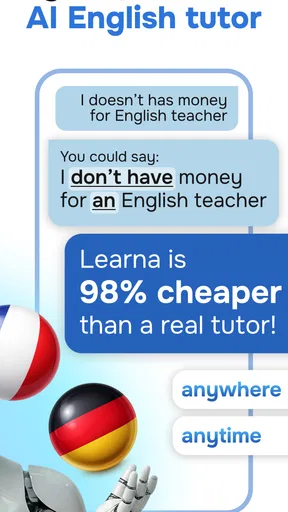
Speaking to an AI can feel less intimidating than talking to a person, especially when you are still searching for words. That is one of the most useful ideas behind Learna: it puts speaking practice close to the center of the experience rather than treating language learning as only reading or memorizing. For a learner who understands a sentence but hesitates to say it, that shift can matter.
The same format can also create friction. If a prompt feels unfamiliar, a learner may not know whether the problem is vocabulary, pronunciation, listening, or simply not understanding what kind of answer is expected. My advice is to keep the first attempts simple. Use short, familiar sentences, and focus on getting a thought across before trying to sound polished. That makes it easier to notice what you actually need to practice.
AI practice should not be mistaken for a guarantee that every correction will capture the nuance a human teacher would notice. A response may help you keep a conversation moving, but it is still worth checking whether you understand the correction and can reuse it in another sentence. If feedback feels confusing, slow down and isolate one issue rather than repeatedly trying the same full response.
This is particularly relevant for pronunciation. A learner can make progress by speaking aloud and paying attention to recurring trouble spots, but an app session is not the same as a live listener navigating accents, interruptions, and context. I would use the practice to build confidence and fluency, then seek real conversations when the goal is handling spontaneous back-and-forth.
Choose a useful starting point
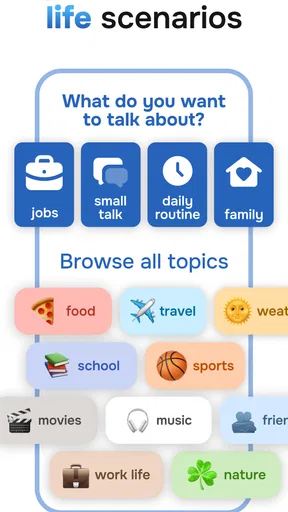
Before beginning a session, decide what you want to accomplish: introduce yourself, describe your day, ask for directions, or explain a familiar task. A small goal gives the practice a clear shape. It also makes it easier to judge whether a session helped, instead of finishing with a vague sense that you spent time around the language.
If you are a beginner, keep the topic close to things you can already express. If you are more comfortable, try explaining an opinion or retelling an event. The key is to make the challenge just large enough to expose gaps without turning every reply into a struggle. For me, that is a more dependable way to use an AI language app than chasing long sessions simply because they feel productive.
Setup checks that prevent avoidable frustration
When a language-learning app seems not to be working as expected, I first check the basics before assuming the lesson itself is at fault. Confirm that the intended language is the one you mean to practice, read each prompt carefully, and make sure the device is ready for a spoken exercise if that is what you are attempting. These small checks are especially helpful when switching between English and Spanish or returning after a break.
It also helps to distinguish a learning problem from a navigation problem. If you are unsure what to do next, pause and read the current screen rather than tapping quickly through instructions. A rushed start can make a straightforward exercise feel confusing. If the app appears unresponsive, closing and reopening it or checking that the device has a stable connection are sensible general steps, without assuming a particular technical fault.
Learna is free to download, but it includes in-app purchases ranging from $0.99 to $199.99 per item. I would check the purchase details shown in the app store and on any purchase screen before committing, particularly if you are trying it for a child or sharing a device. The app has an Everyone age rating, but that does not remove the need for an adult to review spending choices and decide whether the learning approach fits the child.
It runs on Android 7.0 or later, and its current version is 4.0.2. If an installation or update is giving you trouble, checking that the device meets the minimum operating-system requirement and has enough room for the update is a practical first step. On iOS, use the app store’s compatibility information for the device in hand rather than assuming the Android requirement applies there.
Make the first week easier to sustain
I would start with a modest routine rather than trying to transform a busy day around language study. A useful everyday scenario is a commute or a quiet break: choose one familiar subject, speak a few short responses, and finish by noting one phrase or correction you want to remember. That creates a bridge between app practice and something you might say outside the app.
Another helpful approach is to reuse the same topic on different days. For example, describe your morning once, then return to it later and add details or vary the tense. Repeating a familiar subject can reveal whether a phrase has become available to you naturally, instead of merely being recognizable when it appears on screen. This is a deliberate practice strategy, not a claim that the app automatically tracks or schedules such a routine.
Keep a separate note of questions that remain unclear. If you receive feedback you cannot explain in your own words, mark the phrase and check it with a trusted reference or teacher later. That prevents an uncertain correction from becoming something you repeat confidently. It also makes the app more useful for independent learners who want to bring specific questions to a class or conversation partner.
Recovering when a session goes off track
If you stumble over a prompt, I would not restart the whole session immediately. Try a shorter answer, use simpler vocabulary, or say the idea another way. The aim is to recover communication, not produce a perfect sentence on the first attempt. That is a valuable habit for real conversations, where you often need to rephrase rather than stop speaking.
When an answer is marked or interpreted in a way that seems unexpected, repeat it at a slower pace and make the sentence more direct. If the result still feels wrong, move on and return to the point later. Repeating the identical attempt without changing anything can turn practice into frustration, while a small change can help identify whether the issue was pronunciation, wording, or the prompt itself.
For a learner who is switching languages, avoid treating one session as proof of overall ability. Comfort in English may not match comfort in Spanish, and the topics you can discuss in each language may differ. I would keep expectations separate and choose a level of challenge for each language based on what you can currently say, not on how well you perform in the other one.
When the app is not the real obstacle
Sometimes the difficulty is not the software. A noisy place can make speaking or listening practice harder; tiredness can make familiar words feel inaccessible; and anxiety can make even a simple introduction feel demanding. In those situations, a quieter moment or a shorter exercise may help more than changing settings or repeating the same attempt.
It is also possible to expect an AI practice session to do a job that needs a different tool. If you need a structured grammar explanation, a teacher or a course organized around explicit lessons may suit you better. If you need real-world conversational timing, a language exchange or tutor can provide human reactions that an app cannot replace. Learna makes most sense as one part of a learning plan, not the entire plan for every learner.
Compared with flashcard apps, its appeal is the chance to put language into spoken use rather than focusing mainly on reviewing isolated items. Compared with a classroom course, it is likely to feel more flexible and less socially demanding, but that convenience comes with less human guidance. Learners who enjoy a fixed sequence of units, detailed grammar instruction, or accountability from a teacher should consider pairing it with those alternatives instead of expecting one app to cover every need.
Who I’d recommend it to
I’d recommend giving Learna a try if you want to speak English or Spanish more often, feel self-conscious practicing with other people, or need a low-pressure way to turn familiar words into spoken sentences. It may also suit someone who already studies through classes or books and wants a place to rehearse everyday topics between lessons. Deep Flow Apps has built an app in the education category with a substantial audience, and its 4.6 average rating is encouraging, though personal fit matters more than popularity.
I would skip it, or at least avoid relying on it alone, if you want a complete teacher-led curriculum, need extensive explanations before speaking, or are primarily studying another language. It is also not the right substitute for human conversation when your immediate goal is to handle unpredictable real-world exchanges. Those are not reasons to dismiss the app; they are reasons to use it for the job it appears best suited to: repeated, approachable language practice.
My practical verdict is that Learna is worth trying if speaking is the part of language learning you tend to postpone. Start with simple topics, check your setup before blaming a confusing session, and treat feedback as something to understand rather than accept blindly. Released on September 24, 2024, and now at version 4.0.2, it offers a free starting point with optional purchases. If you use it consistently and pair it with human conversation or more structured study where needed, it can be a useful addition to your learning routine rather than a promise of fluency on its own.
Pros and cons
Pros
- Short lessons make it easier to practice during brief breaks.
- Speech recognition gives feedback on spoken answers.
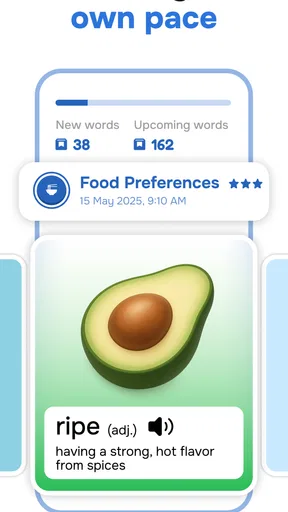
- Vocabulary reviews help reinforce previously learned words.
- The app offers courses for both English and Spanish learners.
- Progress tracking helps users see their learning activity.
Cons
- Some lessons and features may require a paid subscription.
- Speech recognition can struggle with accents or background noise.
- The learning experience depends on a reliable internet connection.
- Frequent reminders may feel distracting to some learners.
- App-based practice may not provide much real conversation experience.


